You know what is the worst thing that a web browser can do? I just learned what – lose bookmarks. Not just the favicons, not just the order, not even the URLs – lose all the bookmarks completely. This is what Firefox 3 did.
As part of the upgrade I made sure to recreate the profile (who knows what kinds of crap an upgrade might cause) so it was a fresh install. About a week later – my bookmarks are gone:
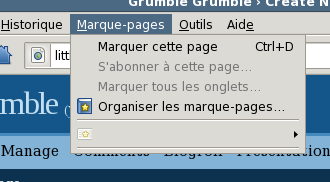
In case you need a translation – that’s the bookmarks menu with no bookmarks in it.
So what do I do? I go to my profile folder, see a folder there called ‘bookmarkbackups’. Pretty quickly I figure out that this can be restored using the bookmarks manager. So I do that, and my bookmarks are back. I may have lost one or two new ones, but disaster has been averted.
Two days later, the same shit happens again. Only this time I was busy doing real work and didn’t bother to restore the bookmarks right away. I think that was a mistake.
It seems there’s some sort of rotation going on in ‘bookmarkbackups’, the kind of mindless rotation for any kind of backup – “Since you haven’t complained, I will assume that you like the bookmarks the way they are, I will delete the oldest backup and replace it with what I have now”. And guess what I end up with? That’s right, no backup.
There is a something in the backup folder called bookmarks-2008-06-23.json, but firefox won’t restore from it, claiming “Impossible de traiter le fichier de sauvegarde.” – that’s roughly “Corrupted backup file”. Great.
The story’s ending isn’t all bad. Just after the upgrade I got the urge to backup my profile folder, and I did. So my bookmarks are still recoverable. But I’ll be damned if I’m using Firefox 3.0 as my main browser again. Maybe this is just one little bug and they’ll fix it, but maybe not..
The sad thing is I’ve watched this movie before – a great product being lost because of a lack of resources. Seamonkey was killed, Thunderbird is getting killed, I wonder if Firefox for Linux is next.